A five-second habit worth having
That innocent-looking bit.ly/xk3Rt9 in your inbox could lead to a recipe, a news story, or a fake bank login page. From the link alone, there's no way to tell, and most of us click without thinking twice.
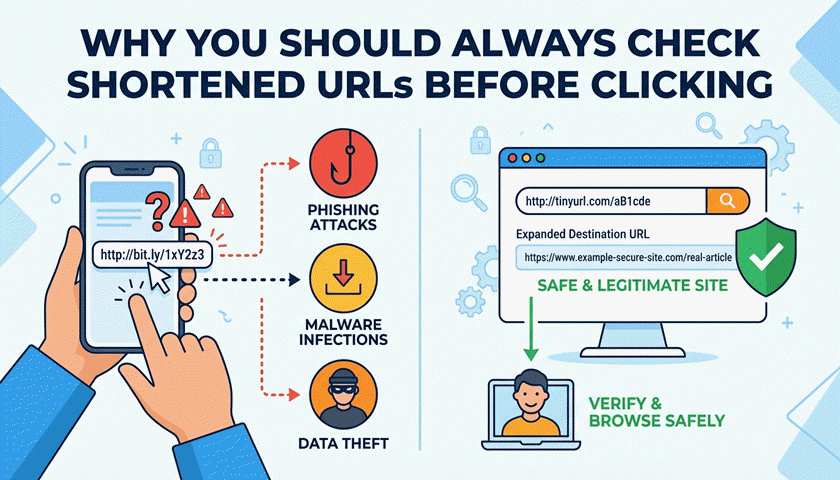
URL shorteners turn long web addresses (URLs) into short codes that fit neatly into text messages, social media posts and emails. Services such as Bitly and TinyURL have made the web tidier. But that tidiness has a cost: you can no longer see where you're going before you get there.
That one fact has made short links a favourite tool for scammers. The good news is that checking where a short link leads takes about five seconds, needs no technical skill, and removes the scammer's biggest advantage. This post shows you how.
The invisible destination
A normal web address tells you a story before you click. In https://www.yourbank.com.au/login you can read the website's name (the domain, yourbank.com.au) and the page (/login), and decide whether it looks right.
A short link tells you nothing about the destination. Compare:
What you see:       https://bit.ly/a8Xq2r

What it could hide: https://yourbank-secure-login.example-scam.top/verify
The gap between those two lines is where scams live. Behind the scenes, the shortener simply sends your browser on with a redirect, an instruction to go to another address, and it happens so quickly you rarely notice the jump.
Key idea: the shortener's own name (bit.ly, tinyurl.com) is perfectly legitimate. That's exactly why scammers like it: the trustworthy wrapper hides an untrustworthy destination, and it can help their messages slip past filters that block known scam websites.
How criminals use short links
1. Phishing
Phishing means pretending to be a trusted organisation, such as a bank, delivery company or government agency, to trick you into handing over details. A short link hides the fake website's address, so a text saying "Your parcel is on hold: bit.ly/…" looks no different from a genuine one. The destination is usually a convincing copy of a real login or payment page.
2. Malware
Malware is software designed to harm your device or steal information. A short link might promise an invoice, a photo or a "missed delivery" form, and instead offer you a file to download or an app to install. Modern browsers and phones block most attempts to install things silently, so these scams usually rely on persuading you to open the file or tap "Install". Keeping your device updated closes the rarer gaps that don't need your help.
3. Checking that you're real
Whenever you visit any website, it can see basic details such as your rough location (from your IP address, your internet connection's number), your device and browser. Shorteners count clicks too. Scammers can use this to learn which phone numbers and email addresses belong to real, responsive people, and target them again.
4. Redirect chains and disguises
A short link can bounce through several redirects before arriving anywhere. This is a redirect chain. Each hop makes it harder to trace who's behind it, and some scam sites deliberately show a harmless page to security scanners while showing the scam to ordinary visitors. This trick is called cloaking.
5. Trusted places, untrusted links
Scammers post short links in comments on YouTube, Facebook, LinkedIn and community forums, or send them from friends' hacked accounts. A familiar setting lowers our guard: the surroundings do the convincing, and the link does the damage.
6. QR codes
A QR code is a short link you can't read at all. Scammers stick fake QR codes over real ones on parking meters, posters and restaurant tables, or send them in emails. Phishing via QR code even has a nickname: quishing. Most phone cameras show the web address before opening it, so read it first.
How to check a short link before you click
Here are five ways to see where a link really goes. The first two work for almost anyone.
- Use a link expander. Copy the short link (on a computer, right-click and choose Copy link; on a phone, press and hold, then Copy). Paste it into a URL expander. It follows every redirect for you and shows the final destination, without your browser ever visiting it.
- Use the shortener's own preview. Several shorteners have a built-in preview page (see the table below).
- Check the destination's reputation. Paste the expanded address into a free checker such as VirusTotal or Google's Safe Browsing site status page. These compare it against lists of known dangerous websites.
- Hover or long-press. On a computer, rest your mouse pointer over a link to see its address in the corner of the screen; on a phone, press and hold. With a short link, this usually only shows the short address, but it does catch a different trick: link text that says
www.mybank.com.auwhile the real link goes elsewhere. - Slow down for unexpected links. A parcel notice for something you didn't order, or a file-sharing link from a colleague out of the blue, deserves extra care, however familiar the sender looks.
| Shortener | Preview trick | Example |
|---|---|---|
| Bitly | Add + to the end | bit.ly/abc123+ |
| TinyURL | Put preview. in front | preview.tinyurl.com/abc123 |
| is.gd | Add - to the end | is.gd/abc123- |
| Anything else | Use a link expander | Works with almost every shortener |
Tip: you don't need to remember every preview trick. A link expander works with almost any shortener, and it also shows each step of a redirect chain, not just the first one.
Reading what you find
Expanding a link only helps if you can judge the address it reveals. The most important part is the domain: the part just before the first single forward slash (/). Read it from right to left.
https://www.auspost.com.au/track             ← domain: auspost.com.au (genuine)
https://auspost.com.au.parcel-help.top/track ← domain: parcel-help.top (fake)
In the second example, "auspost.com.au" is just decoration at the front. The real owner is parcel-help.top.
| Warning sign | Example |
|---|---|
| Brand name inside a longer, different domain | commbank-verify-account.com |
| Swapped or look-alike characters | paypa1.com (number one instead of the letter l) |
Government service not ending in .gov.au | mygov-refund.net |
| Unusual endings for a well-known brand | .top, .xyz, .click |
| An IP address instead of a name | http://203.0.113.45/login |
| Destination doesn't match the message | A "parcel" text leading to a page asking for card details |
Don't be reassured by https:// or a padlock icon on its own. They only mean the connection is encrypted (scrambled so others can't read it). Scam websites get padlocks too.
When short links are probably fine (and when they're not)
Not every short link is dangerous. Most are completely harmless. Context is what tells them apart.
| Lower risk | Higher risk |
|---|---|
| Posted publicly by an account or organisation you know | Sent to you unexpectedly by email, text or direct message |
| The surrounding post clearly matches the destination | The message creates urgency: "act now", "final notice", "account suspended" |
| Uses the organisation's own branded short domain | Comes from a new, odd-looking or out-of-character account |
| Leads somewhere you'd expect, with nothing to fill in | Leads to a page asking you to log in, pay or enter personal details |
Even when a link looks low-risk, checking costs five seconds. When it's higher-risk, the safest choice is often not to use the link at all: open the organisation's official app or type its website address yourself.
The limits of checking, and what to do if you clicked
What checking can't guarantee
- Brand-new scam sites may not be on any blocklist yet, so a "clean" scanner result isn't proof of safety.
- Cloaked sites may show a scanner something different from what you'd see.
- Some short links can be edited by their owner, so a link that was harmless last week could point somewhere else today. Check at the moment you use it.
That's why checking works best alongside common sense: if a link wants your password, card number or a login code, go to the organisation directly instead.
If you've already clicked
- Close the page without entering anything, and don't open anything it downloaded.
- If you entered a password, change it straight away on the real website, and anywhere else you've used it.
- If you entered bank or card details, call your bank immediately using the number on the back of your card.
- If you installed or opened something, delete it and run a security scan.
- Report it. In Australia, report scams to Scamwatch and cybercrime via cyber.gov.au. IDCARE provides free help if your identity details were taken.
Key rule: pause, expand, check, then decide. If what you find doesn't match what you expected, don't click, and report it if you can.
Quick reference glossary
| Term | Meaning |
|---|---|
| URL | A web address. |
| URL shortener | A service that turns a long address into a short link that redirects to it. |
| Domain | The main name of a website, which shows who owns it, e.g. auspost.com.au. |
| Redirect | An instruction sending your browser to a different address. |
| Redirect chain | Several redirects in a row before the final page. |
| Link expander | A tool that reveals a short link's real destination without visiting it. |
| Phishing | Pretending to be someone trustworthy to trick people into giving away details. |
| Quishing | Phishing using QR codes. |
| Malware | Software designed to harm a device or steal data. |
| Cloaking | Showing security scanners a different page from the one real visitors see. |
| IP address | The number that identifies your internet connection. |
Wrapping up
The risks hiding behind short links are real, but the defence is simple. A quick check takes away the one thing a short-link scam depends on: you clicking without looking.
If you remember four things, make them these:
- A short link hides its destination, so you can't judge it by looking at it.
- Expand it first, with a link expander or the shortener's preview trick.
- Read the real domain from right to left; a padlock alone proves nothing.
- If a link asks you to log in, pay or share details, go to the organisation directly instead.
Make checking short links a reflex, like looking both ways before crossing the road. And share the habit with someone who's never thought to question a link.